
Key facts
- Xbox Wire announced on November 23, 2026 that Grand Theft Auto VI supports Xbox Cloud Gaming and Remote Play on Xbox One and Xbox Series X|S.
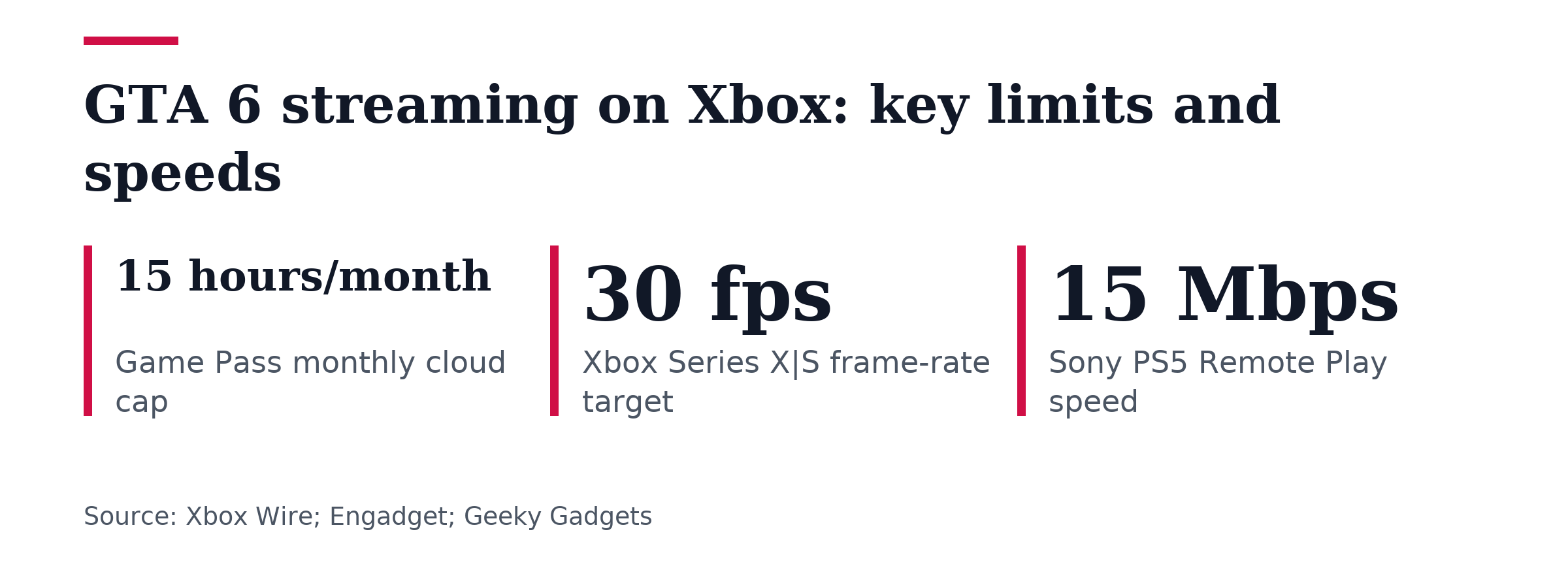
- Users can buy more cloud playtime, and select Game Pass plans offer cloud streaming limited to 15 play hours monthly.
- Cloud-streamed Grand Theft Auto VI uses Xbox Series S graphics settings.
- Remote Play streams gameplay directly from an Xbox Series X|S console to mobile phones, laptops, PCs, and handheld gaming PCs such as the XBOX ROG Ally.
Xbox Wire announced on November 23, 2026 that Grand Theft Auto VI supports Xbox Cloud Gaming and Remote Play on Xbox One and Xbox Series X|S.
Xbox One owners can play Grand Theft Auto VI only through Xbox Cloud Gaming, not locally, and must purchase a digital copy from the Xbox Store. Cloud play on Xbox One is available at the November 19, 2026 launch.
Select Game Pass plans offer cloud streaming limited to 15 play hours monthly, and users can buy more cloud playtime. Xbox previously announced it would restrict free hours on Xbox Cloud Gaming starting in Nov. 2026. To start cloud play, press the Xbox button, search for Grand Theft Auto VI, select Manage, then See in Microsoft Store, then select Play With Cloud.
Cloud-streamed Grand Theft Auto VI uses Xbox Series S graphics settings. Rockstar Games says Grand Theft Auto VI targets 30 frames per second on Xbox Series X|S. Streaming adds input latency that could cause problems during combat or fast driving, so lighter activities may suit remote play better.
Remote Play streams gameplay directly from an Xbox Series X|S console to mobile phones, laptops, PCs, and handheld gaming PCs such as the XBOX ROG Ally. Players enable Remote Play under Settings, Devices and connections, Remote features, by checking Enable remote features, and set the Xbox power option to Sleep so the console can be woken remotely.
Streaming from a player’s own console, rather than remote servers, differs from cloud gaming, which uses remote servers and often requires a subscription. Streaming GTA 6 does not require being on the same network, though a quick and reliable internet connection is needed at both ends to keep input lag and connectivity issues low. Xbox recommends a 5GHz Wi-Fi network running at least 7 to 10 Mbps for remote play, and a wired Ethernet connection offers the best gaming quality.
Grand Theft Auto VI released for PlayStation 5 and Xbox Series X|S on November 19, 2026, and is not yet available on PC. Xbox Cloud Gaming for Grand Theft Auto VI is limited to Xbox consoles and is unavailable on mobile, TV, or PC devices. Grand Theft Auto 6 supports Remote Play on Xbox and PlayStation consoles to stream to PCs, TVs, and mobile devices. Matthew Ball, Xbox Chief Strategy Officer, said Grand Theft Auto VI is not an Xbox streaming exclusive and won’t stream on PC.
Rockstar Games announced on November 10, 2026 that Grand Theft Auto 6 would be playable via Xbox Cloud on Xbox Series X|S and Xbox One, in addition to being available for pre-loading. Asha Sharma said on November 10, 2026 that Grand Theft Auto VI marks the first step in a new 10-year strategic partnership with Take-Two, and that the game is already the most pre-ordered title ever on Microsoft Store. “Today marks the first step in our new 10-year strategic partnership with Take-Two.”
Yahoo Tech says Grand Theft Auto 6’s Xbox Cloud Gaming compatibility is limited to Xbox consoles and, as far as it can tell, is the only Xbox Cloud game with this restriction. Yahoo Tech reached out to Microsoft to comment on exactly why the cloud restriction is in place.
Using Xbox Remote Play, Grand Theft Auto VI streams from an Xbox Series X or Series S to a Steam Deck, with the game running on the console and the Steam Deck showing the stream and handling controls. GameTechPlanet tested Greenlight and Google Chrome on Steam Deck and prefers Chrome, which felt slightly better for input latency. GameTechPlanet advises disabling motion blur in the game’s settings.
Sony offers the PS Remote Play app that can be installed on Android, iOS, macOS or Windows devices to stream GTA 6 from a PS5. Sony recommends a connection speed of 15 Mbps for remote play, and on PS5 players enable Remote Play under Settings, System, Remote Play, then turn on Stay Connected to the Internet and Enable Turning on PS5 from Network under Power Saving.
An Xbox controller pairs by holding the Pair button for three seconds, then adding it in the device’s Bluetooth settings. Chrome and Microsoft Edge are among the easiest browser options for Xbox Remote Play on Steam Deck, and in Chrome players sign in with the same Xbox account as the console, choose Remote Play rather than Cloud Gaming, and select the console to connect. GameTechPlanet advises checking the network before streaming, since a closed NAT type, which can block or slow connections between devices, might slow down or hurt the connection.
Join the discussion